How statistical data is stored and calculated
Stat data storage
Everything happening in the Qmatic system is stored in the stat database as events.
For each visit, an event is stored when:
-
a customer arrives
-
a customer is called
-
a customer is transferred
-
the service is ended
-
etc.
In addition, information is also about:
-
in which branch
-
at which service point
-
by which staff member
-
for which service the visit takes place
-
etc.
From these stored events, metrics such as waiting times and serving times are calculated. These metrics are used together with the information about branch, staff member, etc., to build for example reports.
Stat definitions
Important Terms
Glossary
-
Transaction
A transaction starts when the customer is called, and ends when the customer is served or transferred. -
Visit
A visit is the lifetime of one ticket. A visit starts when the customer enters the queue and ends when the customer's last service is served. -
Visit Transaction
A normal visit transaction starts when a customer enters the queue, and ends when the customer is served or transferred. A “normal” visit only consists of a single visit transaction. But in cases where the visit is transferred or contains multiple services, the visit contains multiple visit transactions. In the reports, we are most interested in the visit transactions.
The image below shows a normal visit transaction.
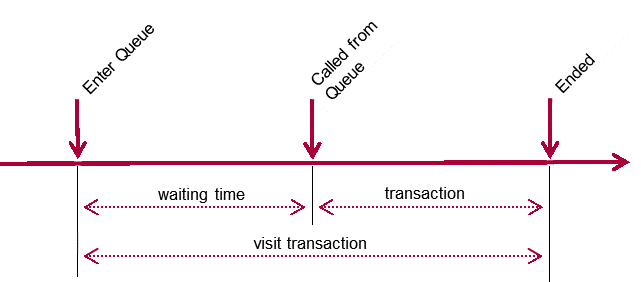
If the customer does not show up and the visit is called again, it is the last call that is used.
There are, however, other scenarios. If a customer is transferred to a queue or a pool, this will result in multiple visit transactions during one visit.
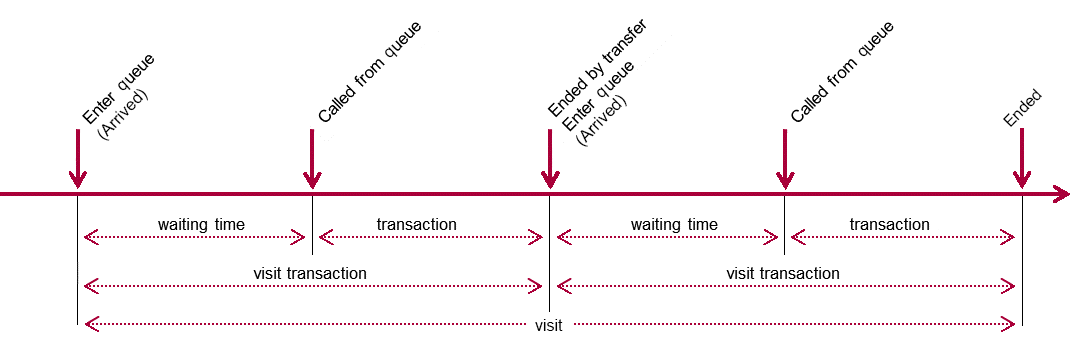
The visit transaction is ended when it is assigned an outcome. The possible outcomes are shown in the table below.
| Id | Outcome | Description |
|---|---|---|
| 1 | Normal | The visit transaction was ended in a “normal” way, i.e. the staff member called the next customer, finished the visit, or closed the counter. |
| 2 | No show | The customer was called but did not show up. The staff member then marked the visit as a no show. |
| 3 | Remove | The visit was removed from the queue by staff before being called. |
| 4 | Recycle | Used to be an outcome in earlier versions but is not considered a visit transaction outcome. |
| 5 | Transfer to queue | The visit was transferred to a queue. |
| 6 | Transfer to service point pool | The visit was transferred to a service point pool. |
| 7 | Transfer to staff pool | The visit was transferred to a staff pool. |
| 8 | Remove by reset | The visit was removed as the result of a branch reset. |
| 9 | Remove by customer | The visit was removed by the customer, for example when using Mobile Ticket. |
| 10 | End by force logout | The visit was ended due to forced logout. |
| 11 | Remove by publish | The visit was removed due to publish. |
| 12 | Ended by logout | The visit was ended due to logout. |
| 13 | Ended by Shiro timeout | The visit ended due to Shiro timeout. |
| 14 | Ended by terminal timeout | The visit ended due to terminal timeout. |
Incomplete visit transactions
No Shows
As seen above, a visit transaction can have different outcomes. In some cases, this results in the visit transaction being “incomplete”. For example, when a visit is marked as no show.
A staff member can mark a visit as a no show when a customer is called from the queue and no one shows up. The waiting time for a no-show customer is stored in the data. The transaction time is not stored in the data. The main reason is that a no-show customer would influence the average and total transaction times for a service or queue and would make it cumbersome to analyze such data in an appropriate way.
Removed Visits
When a customer is removed from a queue, the visit is removed from statistics altogether. The waiting time is measured but not saved. This is due to the fact that we don't know why it was removed; maybe a customer accidentally took two tickets and a staff member removed the faulty one.
Walking time and wrap-up time
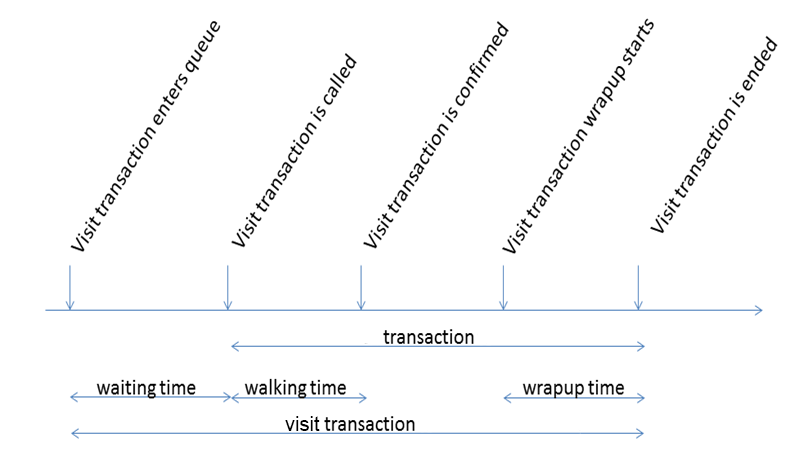
The system can be configured so that the staff member is asked to confirm that the customer has arrived. The staff member can also add wrap-up time to a visit. The walking time and the wrap-up time are both part of the transaction time.
Service point session and staff session
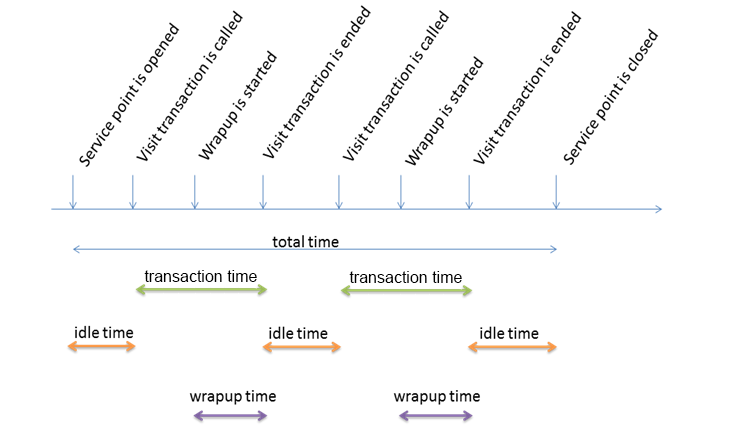
A service point session starts when the service point is opened and ends when it is closed. The time between transactions counts as idle time. The same principles can be applied to staff sessions, the only difference is that a session start when the staff member logs in and ends when he or she logs out (the staff member can close the service point without logging out).
Appointments
An appointment is an agreed intention to a visit, i.e. a visit booked in advance.
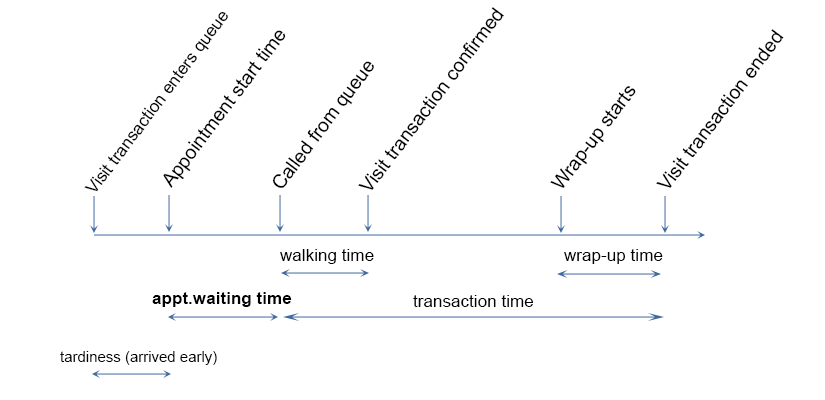
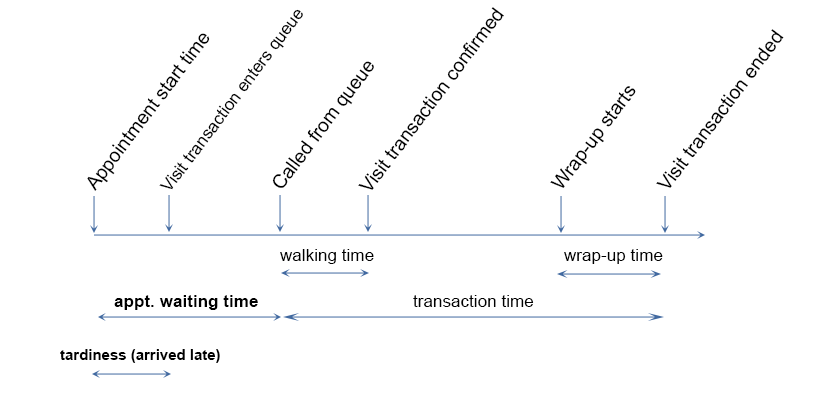
When an appointment is checked in, either in a kiosk or in a reception or in another way, a normal visit transaction starts. Therefore, time metrics such as waiting time, walking time, transaction time etc., are retrieved from the visit transaction(s) in which the appointment is served.
If appointment customers are segmented in to appointment queue, an appointment waiting is calculated. The appointment waiting time is based on the booked appointment time and does not depend on if the customers checks in before or after the appointment time.
If customer checks in early:
If customer checks in late:
Stat metrics
The stat data is made up from dimensions and metrics. These come from the events stored in the Qmatic system. Dimensions are attributes of your data, i.e. “what you report against”. It can be for example branch, queue, hour. Metrics, on the other hand, are quantitative measurements, calculated from the stored events.
While dimensions are more or less self-explanatory, metrics require some explanations to understand how they are calculated. There are three main metrics:
-
count metrics (e.g. number of arrived, called, served)
-
time metrics (e.g. waiting time, transaction time)
-
time interval metrics (e.g. number of customers with a waiting time of 0–5 minutes).
When number of customers is calculated, that doesn’t necessarily correspond to the number of individual customers. This is because a customer is counted each time he or she takes part in a visit transaction.
In the table below, you find count and time metrics that require some extra explanation.
| Metric | Description |
|---|---|
| Arrived | Number of arrived customers, based on the number of visits inserted in a queue. Does not include visits that are removed, either by staff member, by publish, or by the customer (in Mobile Ticket). |
| Called | Number of customers that were called by a staff member. Recycled visits are not counted as called. |
| No shows | Number of customers marked as a no show (did not show up at the service point). A no show counts as called but not served. |
| No shows (%) | The percentage of all called customers that were marked as no shows. |
| Served | Number of served customers. All called visits are served, except for no shows (recycled are not called so they are not served either). |
| Served (%) | The percentage of the arrived customers who were served. |
| >TSL | Number of customers whose transaction time was above the transaction time service level, set to the service in Business Configuration (called “serving time” in Orchestra). |
| > WSL | Number of customers with a waiting time above the waiting time service level, set to the queue in Business Configuration. |
| < WSL | Number of customers with a waiting time below the waiting time service level, set to the queue in Business Configuration. |
| > WSL (%) | The percentage of all served customers who had a waiting time above the service level. |
| Idle time (service point) | The total time a service point was open but did not serve any customers. |
| Idle time (%) (service point) | The percentage of the time the service point was open but did not serve any customers. |
| Idle time (staff) | The total time a staff member was logged in but did not serve any customers. |
| Idle time (%) (staff) | The percentage of the time the staff member was logged in but did not serve any customers. |
| Transaction Time (customer) | Time from when the visit transaction is called (i.e. when the visit call event occurs and the visit is shown on for example displays) until it is ended, either in a normal way (outcome 1) or transferred (outcome 5,6,7). |
| Transaction time (staff) | Time from when the staff member selects Next until visit transaction is ended, either in a normal way (outcome 1) or transferred (outcome 5,6,7). |
| Waiting Time | Time from when the visit transaction is created until it is called. |
| Appointment waiting time | Time from booked appointment time until called. |
Note:
-
If the visit transaction was transferred, there will be a new visit transaction created at the same time as the previous visit transaction was ended.
-
If a visit transaction is part of a multi-service visit, ending the transaction will mean that the next service in the list will enter queue and the create time for the next visit transaction will be the end time of the previous.